Achieving Digital Balance: A Step-by-Step Guide to Reducing Notifications by 30% in 2026

In an increasingly hyper-connected world, our attention has become the most valuable commodity. Every ping, buzz, and flash from our devices vies for a piece of it, often leaving us feeling overwhelmed, distracted, and perpetually ‘on call.’ The relentless barrage of digital notifications not only fragments our focus but also contributes to increased stress levels, reduced productivity, and even impacts our mental well-being. This isn’t merely a minor inconvenience; it’s a pervasive issue that demands our immediate attention and a proactive solution. The goal? To achieve a significant digital notification reduction, aiming for a 30% decrease by 2026. This might sound ambitious, but with a structured approach and consistent effort, it’s an entirely attainable and profoundly beneficial objective.
The year 2026 might seem far off, but establishing a long-term goal provides the necessary framework for sustainable change. This isn’t about a quick fix or a temporary digital detox; it’s about cultivating new habits, re-evaluating our relationship with technology, and ultimately reclaiming control over our attention and time. The benefits extend far beyond simply fewer interruptions; they encompass improved concentration, enhanced creativity, better sleep, and a greater sense of presence in our daily lives. By systematically addressing the sources of these digital intrusions, we can carve out more space for deep work, meaningful connections, and personal reflection.
This comprehensive guide will walk you through the essential steps, practical strategies, and indispensable tools required to embark on your journey towards significant digital notification reduction. We’ll delve into understanding the psychology behind our notification addiction, identifying the biggest culprits, and implementing actionable solutions that are both effective and sustainable. From auditing your current notification habits to leveraging advanced device settings and fostering mindful tech use, we’ll cover every facet necessary to empower you to take charge of your digital environment. Prepare to transform your digital experience, one thoughtful adjustment at a time, and pave the way for a more focused and balanced future.
Understanding the Notification Epidemic: Why We’re So Hooked
Before we can effectively implement digital notification reduction strategies, it’s crucial to understand why notifications are so pervasive and why we find them so difficult to ignore. Our brains are hardwired for novelty and reward. Each notification, whether it’s a new email, a social media like, or a news alert, triggers a small dopamine release, creating a subtle but powerful addiction loop. This intermittent reinforcement – not knowing when the next reward will come – makes us constantly check our devices, fearing we might miss out (FOMO: Fear Of Missing Out). Tech companies are acutely aware of this psychology, designing apps and platforms to maximize engagement through precisely these mechanisms.
The Psychology Behind Notification Addiction
- Dopamine Loops: The ‘ping’ is a reward signal, releasing dopamine and creating a craving for more.
- Fear of Missing Out (FOMO): The anxiety that something important or interesting is happening without our knowledge.
- Social Validation: Likes, comments, and messages provide social reinforcement, feeding our need for connection and approval.
- Urgency Bias: We’re conditioned to believe that all notifications require immediate attention, even when they don’t.
- Habit Formation: Repeated checking of devices in response to notifications becomes an unconscious habit, difficult to break.
Recognizing these psychological drivers is the first step towards breaking free. It’s not a lack of willpower; it’s a deeply ingrained behavioral pattern that has been deliberately cultivated by design. By acknowledging this, we can approach digital notification reduction with a more informed and strategic mindset, rather than simply blaming ourselves for being ‘distracted.’
Phase 1: The Digital Audit – Identifying Your Notification Landscape
The journey to significant digital notification reduction begins with a thorough understanding of your current notification habits. You can’t fix what you don’t measure. This phase involves a careful audit of all your devices and applications to pinpoint the biggest sources of interruption.
Step 1.1: Track Your Notifications for One Week
For seven consecutive days, consciously pay attention to every notification you receive. You don’t need to act on them, just observe. Consider using a simple tally system or a dedicated app to track:
- Source: Which app or platform is sending the notification? (e.g., Email, Instagram, News App, Messaging)
- Type: What kind of notification is it? (e.g., new message, like, news alert, system update, promotional)
- Time: When did you receive it? (Helps identify peak distraction times)
- Impact: How did it make you feel? (e.g., anxious, curious, annoyed, irrelevant)
This data will provide invaluable insights into your personal notification patterns and reveal the true extent of the interruptions you face daily. Many people are genuinely surprised by the sheer volume and often the trivial nature of the notifications they receive.
Step 1.2: Categorize and Prioritize
Once you have a week’s worth of data, categorize your notifications into three main groups:
- Essential: Notifications that genuinely require immediate attention or are critical for your work/personal safety (e.g., emergency alerts, urgent work communications, family messages).
- Useful but Not Urgent: Notifications that provide valuable information but don’t demand instant action (e.g., certain emails, calendar reminders, specific news updates).
- Non-Essential/Distracting: Notifications that are purely for engagement, entertainment, or promotional purposes and rarely add value to your immediate tasks (e.g., social media likes, game notifications, unsolicited app updates).
Your digital notification reduction efforts will primarily focus on the ‘Non-Essential/Distracting’ category, with careful consideration for the ‘Useful but Not Urgent’ group.
Phase 2: Implementing Strategic Reduction – Practical Solutions
With a clear understanding of your notification landscape, it’s time to implement concrete strategies for digital notification reduction. This phase focuses on actionable steps you can take across all your devices.
Step 2.1: Declutter Your Apps and Subscriptions
Fewer apps mean fewer potential notification sources. This is a foundational step for effective digital notification reduction.
- Delete Unused Apps: Go through your phone, tablet, and computer. If you haven’t used an app in months, or if it doesn’t serve a clear purpose, delete it.
- Unsubscribe from Unnecessary Emails: Many ‘notifications’ come in the form of promotional emails. Dedicate time to unsubscribe from newsletters and marketing lists you no longer read.
- Review Social Media Follows: Curate your social media feeds. Unfollow accounts that don’t add value or frequently post distracting content.
Step 2.2: Master Your Device’s Notification Settings
This is where the real work of digital notification reduction begins. Dive deep into the settings of your smartphone, tablet, and computer. Every operating system (iOS, Android, macOS, Windows) offers robust notification management tools.
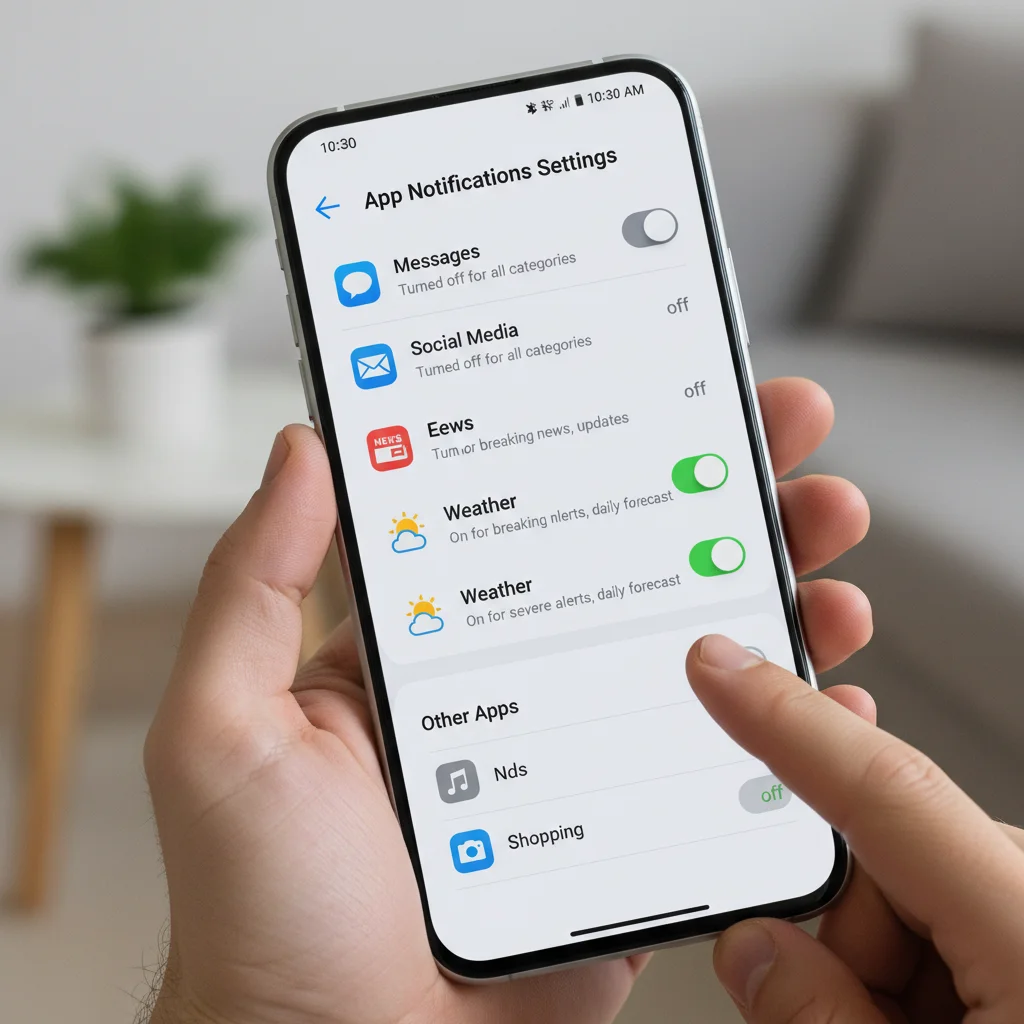
Smartphone/Tablet Settings:
- App by App Review: Go into Settings > Notifications (or similar path) and review each app individually. For non-essential apps, turn off all notifications completely. For useful apps, customize them:
- Turn off sounds/vibration: Allow notifications to appear silently.
- Disable badges: Prevent those little red numbers from appearing on app icons.
- Choose delivery methods: Opt for notifications to appear only in the Notification Center, not on the lock screen or as pop-up banners.
- Group Notifications: Many OS allow you to group notifications from the same app, reducing clutter.
- Scheduled Summary/Delivery: Utilize features like iOS’s ‘Scheduled Summary’ or Android’s ‘Notification History’ to receive non-urgent notifications in batches at specific times.
- Do Not Disturb (DND) / Focus Modes: Learn to use these powerful features. Configure DND to activate automatically during work hours, sleep, or focused tasks. Allow only essential contacts or apps to break through. Create custom ‘Focus Modes’ for different activities (e.g., ‘Work Focus’ with only work apps allowed, ‘Reading Focus’ with no interruptions).
Computer Settings:
- Browser Notifications: Turn off website notifications. Many websites ask to send you notifications; decline them or revoke permissions in your browser settings.
- Desktop App Notifications: Similar to mobile apps, manage notifications for desktop applications (e.g., Slack, Email clients, calendar). Consider turning off sounds and banners for most.
- Focus Assist (Windows) / Do Not Disturb (macOS): Configure these features to silence notifications during specific times or when you’re using certain applications.
Step 2.3: Leverage Productivity Tools and Browser Extensions
Beyond built-in settings, several tools can aid in your digital notification reduction efforts.
- Email Management: Use features like ‘Send Later,’ ‘Snooze,’ or ‘Unsubscribe’ in your email client. Consider tools like Spark or Superhuman that offer advanced notification controls.
- Browser Extensions: Extensions like ‘StayFocusd’ or ‘News Feed Eradicator’ can block distracting websites or social media feeds during specific times.
- Website Blockers: If certain sites are constant notification sources, consider temporary or permanent blockers during work hours.
Phase 3: Cultivating Mindful Digital Habits – Sustaining the Change
Achieving a 30% digital notification reduction by 2026 isn’t just about tweaking settings; it’s about fundamentally changing your relationship with technology. This phase focuses on building sustainable habits and fostering a more mindful approach to your digital life.
Step 3.1: Schedule Your Digital Check-Ins
Instead of reacting to every notification, proactively schedule specific times to check emails, social media, and other non-urgent communications. For example:
- Check email twice a day (e.g., 10 AM and 3 PM).
- Engage with social media for 15 minutes during a lunch break.
- Process messages from communication apps (Slack, WhatsApp) at designated intervals.
This practice trains your brain to expect engagement at certain times, reducing the urge to check constantly and making your digital notification reduction efforts more effective.
Step 3.2: Create Notification-Free Zones and Times
Designate specific periods and places where digital notifications are strictly forbidden.
- Bedroom: Make your bedroom a phone-free zone, especially an hour before sleep. Charge your phone outside the bedroom.
- Meals: Enjoy meals without the distraction of pings and alerts.
- Deep Work Sessions: When you need to concentrate, activate ‘Do Not Disturb’ or ‘Focus Mode’ and place your phone out of sight.
- Nature Walks/Exercise: Leave your phone at home or keep it on silent in your pocket during these activities to fully immerse yourself.
Step 3.3: Practice Digital Minimalism and Intentional Use
Embrace the philosophy of digital minimalism, which encourages you to intentionally and selectively use technology that supports your values and goals, and to confidently prune the rest. For every app or digital service, ask yourself:
- Does this add significant value to my life?
- Does it align with my goals?
- Is there a less distracting alternative?
This intentional approach naturally leads to a more significant digital notification reduction because you’re consuming less distracting content overall.

Step 3.4: Communicate Your Availability
One of the biggest hurdles to digital notification reduction is the expectation of immediate responsiveness. Communicate your new boundaries to colleagues, friends, and family. Let them know when you’ll be available and when you’re focused on deep work or personal time. Setting these expectations can significantly reduce the internal pressure to check every notification.
Phase 4: Measuring Progress and Adapting Your Strategy
Achieving a 30% digital notification reduction by 2026 is a long-term goal that requires continuous monitoring and adaptation. It’s not a one-time setup; it’s an ongoing process of refinement.
Step 4.1: Re-evaluate Periodically
Every few months, repeat your digital audit (Phase 1). Have new apps crept in? Are old notification settings still optimal? Our digital lives evolve, and our strategies for digital notification reduction must evolve with them.
Step 4.2: Utilize Screen Time/Digital Wellbeing Features
Most modern smartphones offer built-in features like ‘Screen Time’ (iOS) or ‘Digital Wellbeing’ (Android). These tools provide detailed reports on app usage, notification counts, and device pickups. Use this data to track your progress towards your 30% reduction goal. Seeing tangible data can be highly motivating.
Step 4.3: Be Patient and Forgiving
You will inevitably slip up. There will be days when notifications get the better of you. This is normal. The key is not to get discouraged but to gently guide yourself back to your established habits. Consistency over perfection is the mantra for successful digital notification reduction.
The Benefits of Significant Digital Notification Reduction
Beyond the immediate relief from constant pings, achieving a substantial digital notification reduction by 2026 will unlock a myriad of benefits that positively impact every aspect of your life:
- Enhanced Focus and Productivity: Without constant interruptions, your brain can engage in deeper, more sustained periods of concentration, leading to higher quality work and greater efficiency. Studies have shown that it can take over 20 minutes to regain focus after a significant interruption. Reducing notifications directly combats this.
- Reduced Stress and Anxiety: The feeling of constantly being ‘on call’ or pressured to respond instantly contributes significantly to stress. By taking control of notifications, you create mental space and reduce the underlying anxiety associated with digital overload.
- Improved Sleep Quality: Blue light from screens and the mental stimulation from notifications before bed can disrupt sleep patterns. Creating notification-free zones, especially in the bedroom, promotes better sleep hygiene and more restorative rest.
- Greater Presence and Mindfulness: When you’re not constantly distracted by your device, you’re more present in real-world interactions, more aware of your surroundings, and more engaged in the activities you choose to pursue. This fosters a greater sense of mindfulness and appreciation for the moment.
- Boosted Creativity and Problem-Solving: Deep thinking and creative breakthroughs often require uninterrupted periods of contemplation. By minimizing digital noise, you create the ideal environment for your mind to wander, connect ideas, and solve complex problems.
- Stronger Relationships: Being truly present when interacting with others – without the urge to check your phone – strengthens bonds and improves communication quality.
- More Time for What Matters: The cumulative effect of fewer distractions means more time for hobbies, personal development, exercise, and spending quality time with loved ones.
Looking Ahead to 2026: A Future of Digital Control
The goal of a 30% digital notification reduction by 2026 is more than just a number; it’s a commitment to a more intentional, focused, and balanced digital life. It’s about shifting from a reactive stance to a proactive one, where technology serves us, rather than the other way around. This journey requires patience, persistence, and a willingness to experiment with different strategies to find what works best for you.
Imagine a future where you open your laptop or pick up your phone not out of compulsion, but out of conscious choice. A future where your attention is a resource you guard fiercely, investing it only in what truly matters. By systematically applying the steps outlined in this guide – from auditing your current habits to mastering your device settings and cultivating mindful practices – you are not just reducing notifications; you are reclaiming your mental space, your time, and ultimately, your well-being.
Start today. Choose one small step from this guide and implement it. Then, build on that success. The path to a digitally balanced 2026 begins with a single, intentional decision. Your future self, with enhanced focus and reduced stress, will undoubtedly thank you for the effort you put in now towards achieving a significant digital notification reduction. Take control, and unlock a more present and productive life.